Web Design & Development
[Web Design and Development Topics]
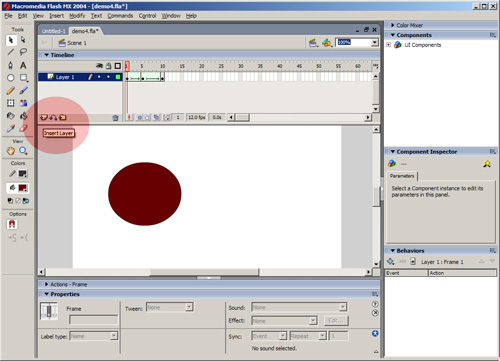
So now we want to try adding a sound to our file. Ok, first open the file (the bouncing ball). First, add a new layer and call is "soundtrack" (rename it by double clicking on it after you have added the new layer)
Now we need to import the sound to that layer. If you don't have a sound file yet, check out http://www.ourdeskdrawer.com/web/topics/flash/sound.html and then choose File > Import > Import to Library > and choose your file:
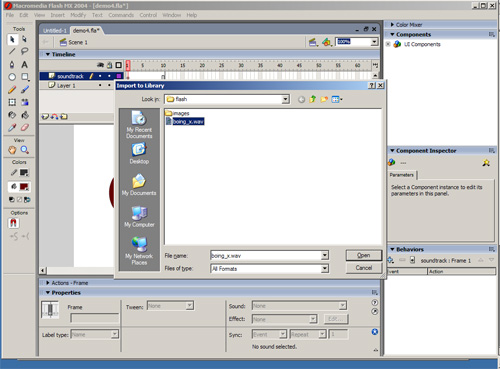
Now you have imported the file. The next thing to do is to add it to yoru timeline. Basically you place the sound in the frame where you want the sound to begin.
First, find the sound in your "library". If you can't see your library then choose Window > Library L
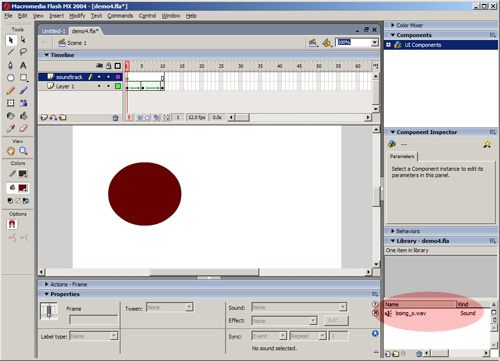
Click on the sound file, then drag it onto the frame and drop it to add it to the timeline. The sound will be added to the first keyframe of the soundtrack layer.
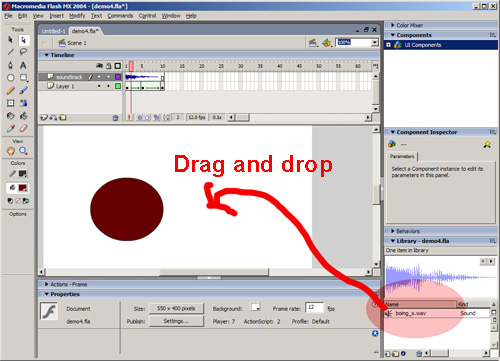
You did it! To try it choose Control > Play.
You could now export it as a "movie" to be played on the Web or elsewhere. Just hit "Export" and then "export movie". You should end up with something like this http://www.ourdeskdrawer.com/web/topics/flash/demo2.swf